
Cut smarter.
Waste less.
Build better.
Professional cutting optimisation for woodworkers, cabinet makers and fabricators. Every run packs your cut list with both the CODA and LEDGE algorithms, then keeps the better layout and shows you which one won.
Example layout for illustration · results vary by job
Runs in the browser — nothing to install.
Two algorithms. One perfect cut.
Cutzilla packs the same cut list with two different strategies, CODA and LEDGE, and keeps the better layout. Here's the same 16-part job under each.
Switch the strategy. See it re-pack.
No account needed — change quantities, grain & edging and watch it re-pack.
Optimise the sheet. Quote the whole job.
Your cutting plan and your quote come out of the same project. Lay the job out, add your prices, labour and markup, and Cutzilla turns it into a clean, client-ready PDF without re-typing the cut list into a spreadsheet.
- Costed from the cut. One click applies the run's real sheet count to the quote, so material cost reflects the boards the layout actually used rather than a rough guess.
- Client-ready PDF. A professional, branded quote straight from the project you just optimised, ready to download and send to your client.
- The whole job, not just the sheet. Cut list, layout, materials, labour, markup and tax in one project, so the quote comes from the same place you planned the cutting.
Quoting, labour and markup are part of the Pro plan.
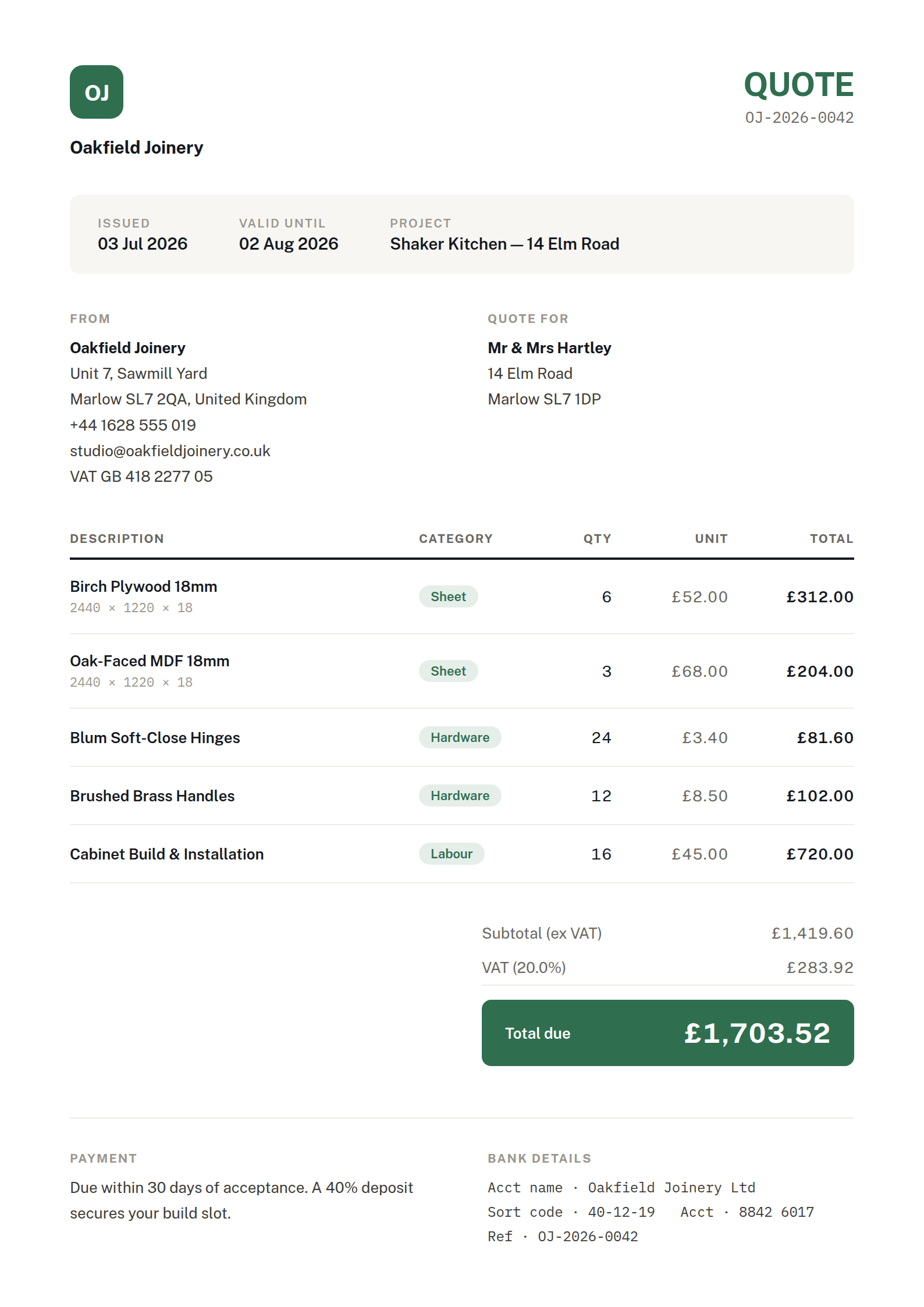
Illustrative — fictional business & client details
Everything the workshop needs
From intelligent nesting to print-ready labels — the tools that take you from cut list to clean cuts.
Smart Algorithm Comparison
Run CODA and LEDGE on the same job. Cutzilla scores both, keeps the better layout, and shows you which one won.
Grain Direction Intelligence
Respects grain orientation on every placement — essential for veneered panels and solid timber. Never re-cut a mis-aligned part again.
Smart Offcut Detection
Automatically flags the largest reusable offcuts against your own minimum length and width — so you can set the good stuff aside instead of binning it.
1D Linear Cutting
Optimise bars, pipes and timber lengths with kerf-aware First-Fit-Decreasing packing — compare stock lengths to cut waste.
Visual Cut Sequence
A numbered, animated guide shows exactly where each cut lands — kerf positions included — so you cut in the right order, every time.
Material Inventory & Labels
Track stock across locations, print a label for every piece, and export PDF, SVG or CSV for the saw or the spreadsheet.
From cut list to clean cuts in minutes
No setup, no spreadsheets to wrangle. Enter your parts and let the algorithms do the packing.
Add your sheets & parts
Type them in or import a CSV. Set kerf, grain direction and stock sizes — Cutzilla remembers your common materials.
Run the optimisation
Pick an algorithm or run both. In seconds Cutzilla compares the layouts and selects the one that wastes the least.
Cut with confidence
Follow the visual sequence, print labels for each piece, and export PDF, SVG or CSV. Done before the kettle boils.
See how we compare
Feature-by-feature against the cutting tools you might be using today.
| Capability | Cutzilla ProYou are here | Tool A | Tool B | Tool C |
|---|---|---|---|---|
| Optimisation | ||||
Multiple algorithm comparison Run strategies and keep the best result | ||||
Grain direction support Respect wood grain in layouts | ||||
Smart offcut detection & reuse Find and re-use the good leftovers | ||||
1D linear cutting Optimise bars, pipes & timber | ||||
| Production | ||||
Visual cut sequence Step-by-step cutting guide | ||||
Label printing A label for every piece | ||||
PDF / SVG / CSV export For the saw & spreadsheet | ||||
| Management | ||||
Material inventory Track stock & locations | ||||
Scan an offcut back into stock Print a QR label, scan it later to book the offcut in | ||||
Job costing & client quotes Price the whole job, not just the sheet | ||||
Web-based, any device No install — work anywhere | ||||
Based on publicly available competitor information, June 2026. Features change — confirm current details with each vendor.
Cutting optimisation is free. You pay for the paperwork.
Layout quality is never the thing we hold back — both algorithms, grain direction and multi-sheet layouts are on every plan, including Free. Paid plans add the exports, labels and business tools around them.
- 5 optimisations a day
- 2 projects and 2 materials
- Both algorithms, compared on every run
- Grain direction and multi-sheet layouts
- Offcut tracking
- PDF and image exports (watermarked)
Just one job? A Project Pass unlocks a single project for $9
- Unlimited projects, materials and optimisations
- Clean exports with no watermark
- SVG, CSV and G-code downloads
- Printable part and offcut labels with QR codes
- Everything in Free
- Quoting workspace with labour, markup and tax
- Your logo and colours on every document
- Warehouses, locations, suppliers and price history
- Scan an offcut label to book it back into stock
- Pro Mode optimiser settings
- Everything in Maker
Project Pass — $9, once
One job to get through and no reason to hold a subscription? A Project Pass unlocks a single project completely — quoting, labels and clean branded exports, with unlimited runs on that project. It never expires, and you can apply it to a project you have already started.
Warehouses, suppliers and stock tracking stay on Pro.
5 passes for $35 if you have a few jobs lined up.
Get a Project PassGood to know
Every run packs your cut list with two specialised algorithms, CODA (column-first) and LEDGE (shelf-based), and keeps the better layout. Each one also tries the sheet both ways round and keeps its own winner. You see which won and why, so nothing about the result is a black box.
Any sheet material — plywood, MDF, melamine, acrylic, metal and glass — plus linear stock like bars, pipes and timber. Grain direction keeps veneers and solid wood aligned, and you can set the exact kerf for your blade.
Usable remainders are measured and listed with every layout. On the Pro plan they become tracked stock: print a label for an offcut, and scanning that label later books it straight back into your warehouse at the right size and location.
Yes — import stock sheets and cut lists straight from CSV, then save and reuse your common materials and lists. Export results as PDF, and on paid plans as SVG, CSV or G-code.
Yes. Five optimisations a day, no card required and no time limit, with both algorithms, grain direction and multi-sheet layouts included. Every new account also starts with a 14-day trial of everything.
See your next sheet optimised — before you sign up.
Try Cutzilla on a ready-made cut list right now. Adjust quantities, grain and edging and watch the waste disappear — no account, no card, no catch.